| System | server side of the monitoring system; access via a web browser |
What the module includes
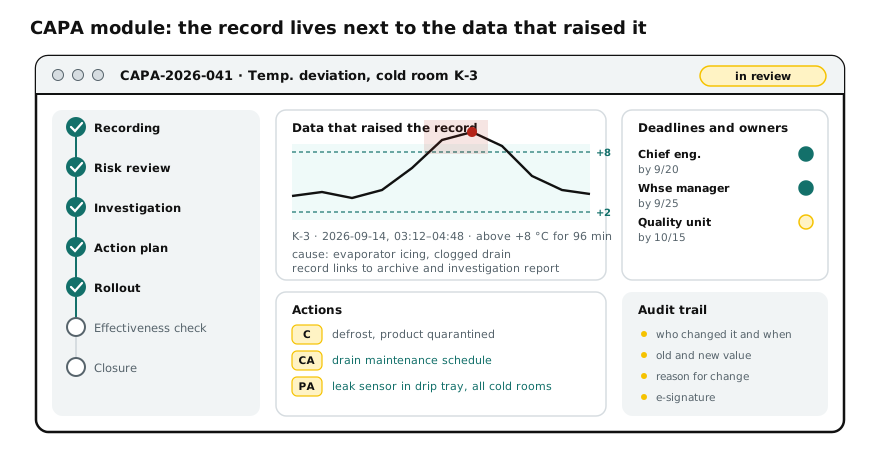
| Record created from an event | an alarm or a mark on a chart becomes a CAPA record that keeps the period, the object and the measured values |
| Classification | source (deviation, complaint, self-inspection, trend), object, risk category |
| Investigation | fields for description and conclusion, attachments, links to the archive and to other records |
| Separate actions | correction, corrective action and preventive action are kept as separate items — they cannot be merged into one line |
| Deadlines and owners | for each action, with reminders and overdue flags |
| Effectiveness check | the criterion and the observation period are set at the planning stage; the record cannot be closed until this step is completed |
| Audit trail | who changed what, when and why; old and new values; the trail cannot be disabled by users |
| Roles and access | personal user accounts, role-based permissions, electronic signature of stages |
| Reporting | open and overdue records, recurrence by object, export for quality review and management review |
Why this is more convenient than a separate logbook
| Situation | Logbook kept separately from the data | Module in the monitoring system |
|---|---|---|
| An auditor asks to see the data for the deviation period | export from the system, search for the entry in the logbook, manual matching | the period opens from the record itself with one link |
| Effectiveness has to be checked six months later | someone has to remember and pull the archive manually | the criterion and period are defined in advance, the data is filled in automatically |
| Similar events in different chambers | the connection is visible only if someone notices it | recurrence by object and event type is calculated automatically |
| A record is edited retrospectively | no trace is left in a file | the audit trail records the change, the author and the reason |
| A deadline has passed | discovered while preparing for an inspection | overdue items are visible in the report and in reminders |
Regulatory compliance
The module stores GxP records, so it was designed in line with Annex 11 of the EAEU GMP Rules, “Computerised Systems”, and EEC Board Recommendation No. 25 of 19 September 2023 on data integrity: audit trail, access control, electronic signature, backup, change control and periodic evaluation.
An important clarification: validation is not performed “at the developer” but for the specific use at your facility — requirements traceability matrix, IQ, OQ and PQ protocols, testing of the audit trail, roles and restore from backup. This is a separate service — monitoring system validation. Having the module does not by itself ensure compliance.
What CAPA is in essence, which requirements govern it and what a record must contain is explained on the page corrective and preventive actions.
How to get it
The module is supplied as part of the monitoring system or added to an existing Rapid SCADA installation. There is no installer for self-installation: the module is configured for the structure of the facility — list of zones, roles, event categories, report templates. We will send the description and user guide on request.
Other software and guides are in the software and guides section.